


M40ABO
Members
-
Joined
-
Last visited
Everything posted by M40ABO
-
hi, I'm hoping you all can help me. My touch screen on my 2010 xf has gone blank, I've been advised and tried doing a hard reset on the battery terminals, I've charged the battery. After the first reset the screen worked, but the next day it was blank again, resetting no longer works. Charging the battery made no difference either. I can't help thinking that the screen isn't broken as it worked after the reset. Any advise before I buy and fit another screen?

-
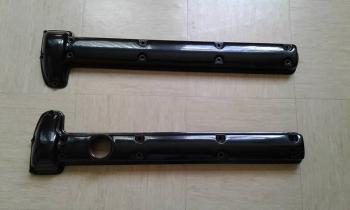
Hi, can anyone confirm for me if these cam covers are from an E-Type please? they are available for sale, postage is available on agreed price. they belonged to my late neighbour, his widow has asked me to look into selling them. They look as though they have been repainted but there are a few minor scratches from storage


-
Would anyone have a rubber seal for the boot of my 2010 XF-s saloon? Mines coming apart!! Please quote to include postage if not near to West Bromwich. Thank you


