
Do Not Sell My Personal Information
Jump to content
View in the app

A better way to browse. Learn more.

Jaguar Owners Club

A full-screen app on your home screen with push notifications, badges and more.

To install this app on iOS and iPadOS
  1. Tap the Share icon in Safari
  2. Scroll the menu and tap Add to Home Screen.
  3. Tap Add in the top-right corner.
To install this app on Android
  1. Tap the 3-dot menu (⋮) in the top-right corner of the browser.
  2. Tap Add to Home screen or Install app.
  3. Confirm by tapping Install.

Zoobox

Members
  • Joined

  • Last visited

Everything posted by Zoobox

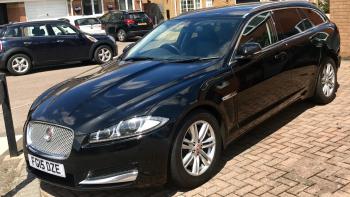
  1. Hi everyone, I have just purchased a Jaguar XF Sportbrake 2.2 Luxury 2015. I just love driving it but I do have some small niggles about some things. I hate the manual saying things that you might or might not have on your particular model of Jaguar. The room in the back of this car is great for my mrs buying huge bits of tat to transport back to our home ! I was interested in reading the topic about keyless entry, so I went outside & could not get any doors to open whilst having the key in my pocket, I replaced the battery & I have perfectly good car battery, so I’m baffled & I tried the spare fob, nothing works, can you shed any light on it for me ? Please


Background Picker
Customize Layout

Account

Navigation

Search

Configure browser push notifications

Chrome (Android)
  1. Tap the lock icon next to the address bar.
  2. Tap Permissions → Notifications.
  3. Adjust your preference.
Chrome (Desktop)
  1. Click the padlock icon in the address bar.
  2. Select Site settings.
  3. Find Notifications and adjust your preference.