
Do Not Sell My Personal Information
Jump to content
View in the app

A better way to browse. Learn more.

Jaguar Owners Club

A full-screen app on your home screen with push notifications, badges and more.

To install this app on iOS and iPadOS
  1. Tap the Share icon in Safari
  2. Scroll the menu and tap Add to Home Screen.
  3. Tap Add in the top-right corner.
To install this app on Android
  1. Tap the 3-dot menu (⋮) in the top-right corner of the browser.
  2. Tap Add to Home screen or Install app.
  3. Confirm by tapping Install.

Martin Bolger

Members
  • Joined

  • Last visited

Everything posted by Martin Bolger

  1. Hi folks, I’m truly stumped and need help. My sportbrake tailgate is acting up. I think one of the powered struts failed and the boot wouldn’t open, so I bought a second hand strut and fitted it. The boot now opens up about a third of the way and stops. I tried the height adjustment process but no joy. The boot also won’t close when I press the button. I bought a new switch and a new module but the issue remains. HELP!
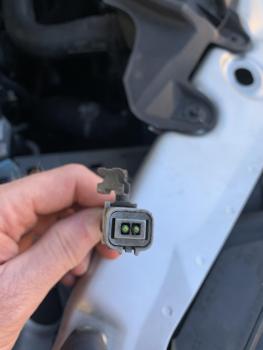
  2. Hi all, I had a root around in the offside section of my Jaguar XF Sportbrake 2013 and have found these wires in the photos. They look like they were cut. Any ideas on what it is? many thanks Martin

Background Picker
Customize Layout

Account

Navigation

Search

Configure browser push notifications

Chrome (Android)
  1. Tap the lock icon next to the address bar.
  2. Tap Permissions → Notifications.
  3. Adjust your preference.
Chrome (Desktop)
  1. Click the padlock icon in the address bar.
  2. Select Site settings.
  3. Find Notifications and adjust your preference.