
Do Not Sell My Personal Information
Jump to content
View in the app

A better way to browse. Learn more.

Jaguar Owners Club

A full-screen app on your home screen with push notifications, badges and more.

To install this app on iOS and iPadOS
  1. Tap the Share icon in Safari
  2. Scroll the menu and tap Add to Home Screen.
  3. Tap Add in the top-right corner.
To install this app on Android
  1. Tap the 3-dot menu (⋮) in the top-right corner of the browser.
  2. Tap Add to Home screen or Install app.
  3. Confirm by tapping Install.

E4Boss

Members
  • Joined

  • Last visited

  1. E4Boss changed their profile photo
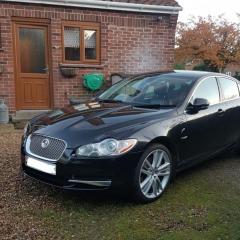
  2. Hi all, new to this site, when I was a kid, my mum told my dad that he couldn't have a Jaguar until he was at least 50, so when I pulled onto her drive in mine at 32, I got quite the brow bashing, from both mum and dad haha, mine is a great car, I have the 2010 XF V6S portfolio, has quite high milage, and the odd age related scuffs here and there, but she runs a dream, and since buying her I've spent plenty keeping her running well, full service, new wishbones, new tyres, hunter wheel alignment, stage 1 remap, ebc discs and pads, and have just a few more niggles that I'm looking to get sorted, and will probably have some questions about in the right topic group, I think I've waffled on enough for a hello! Take it easy, Billy 👍

Background Picker
Customize Layout

Account

Navigation

Search

Configure browser push notifications

Chrome (Android)
  1. Tap the lock icon next to the address bar.
  2. Tap Permissions → Notifications.
  3. Adjust your preference.
Chrome (Desktop)
  1. Click the padlock icon in the address bar.
  2. Select Site settings.
  3. Find Notifications and adjust your preference.