


Jaguar CJS
Members
-
Joined
-
Last visited
Everything posted by Jaguar CJS
-
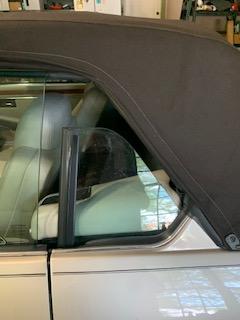
Good Day; I am having some difficulty with the rear windows on my 1995 Jaguar XJS 2+2 Convertible; the problem is that they will not raise all the way. When I put my top up, there is a space large enough to reach into on both sides of the vehicle. This of course results in a potential for water leaking in when it is raining and also wind noise as I am driving. Has anyone else experienced this problem? If so, how do you get the windows to go all the way up? Please refer to the image below. I appreciate all feedback. Jim Norman
-
I recently purchased a low mileage 1995 Jaguar XJS Convertible. I have a switch on the dash that is for Fog Lights but nothing happens when I engage it. I also do not see any fog lights mounted on the car and the owners manual reads, 'Fog Lights, if installed'. My questions is: Were Fog Lights an option on this vehicle and if so. can you recommend a source for fog lights? Thanks; Jim Norman
