


kiddo
Members
-
Joined
-
Last visited
-
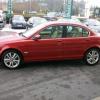 Hi everybody, Please can someone help? Can anybody recommend anywhere that can be trusted in Devon where I can get 4 wheel alignment (laser) done correctly? I visited a national tyre outlet in Taunton for 4 tyres and front wheel alignment. And as you guessed correctly, they sold me the tyres ok, but scratched all the rims at the same time, could only track the rears, could'nt set the fronts, because the chimpanze could'nt undo the track rod ends. (Ah bless!!!!) I cannot trust my main dealer to do anything, after being told by a qualified Jaguar Technichan that my wiper blades are worn out. At which point I produced an invoice for a pair of wiper blades purchased and fitted 1 hour prior to taking it in for a service. You can see my frustration. Any help or advice would be appreciated
 -
Hello everybody, Having just purchased a 56 plate x-type from my local Jaguar main dealer I am in the process of trying to get all of the service data and details so I can tackle the servicing tasks myself. As you may suspect the dealership would not give me any info. A simple question for anybody. What is the torque setting for the wheel nuts (17" Alloys)? Any help would be gratley appreciated Kiddo
