VicPea
Members
-
Joined
-
Last visited
Everything posted by VicPea
-
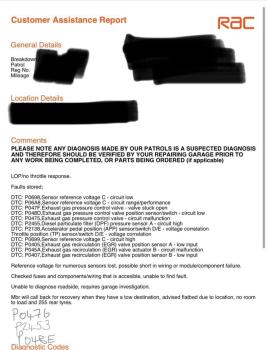
Hi all, I’m new here 👋 Nice to meet you! I was wondering if anyone would be able to help me? I have a 2018 Jaguar XFS Sportbrake. We have had it since 2019. Not had any problems with it, until it randomly broke down the other week when it was raining, it got recovered home, we left it a few days and it started to drive again. We drove it once after in the dry and it was completely fine. I drove it last weekend, in the rain, and it lost power again. I had been driving about 30 miles in the rain with no issues, I put it into park to drop someone off and when I put it in drive again it popped up with “Restricted Performance” and it wouldn’t move. RAC finally came out and gave me the following fault codes. The ones written on were on our fault reader, but didn’t appear on RAC’s one 🤷🏻♀️ Has anyone had a similar problem? If so, how did you fix it? I would like to try and solve it myself before sending it to a garage and spending a fortune. Thank you in advance 🙂