


elroskie
Members
-
Joined
-
Last visited
-
 Both the 2.5 and 3.0 V6 will have the ZF 6HP26, which are identical. Hope that helps!
 -
Hi Mullers, Does it flash up park aid unavailable? I doubt it's related to the battery being changed. It will likely store faults for all four rear parking sensors, one sensor that intermittently goes down will stop all of them working. It will probably show a voltage loss in the rear bumper harness, this loss will return to normal battery voltage if you unplug one at a time to find a faulty sensor. Hope that helps you or the garage working on it!
-
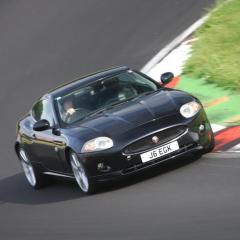
All these Youtube videos of the 'cheapest Jaguar XK X150 in the UK', are all lies. Here it is, the very cheapest at just over £3,500 from Copart in 2022. Looking quite sorry for itself when I bought it, but its been perfect since. It's now been through multiple track days and Euro road trips, never failed me. It was a repossession at Copart so a clean title! It's now on a full set of Michelin Pilot sport 4s tyres, Upgraded to 355mm brakes and calipers on the front axle, with EBC yellowstuff pads, BCRacing coilovers with adjustable dampening, XKR Speed pack rear spoiler, XK60 front lip, XKR rear aero (Can't find another like it!). I know alot about Jags from 2005-present. I mostly joined for an insurance discount but i'd be happy to help anyone who is having problems with theirs. Thanks
