


Raffles
Members
-
Joined
-
Last visited
Everything posted by Raffles
-
 Another probably well known fact that I'm yet to learn... Rear interior lights don't work. Changed fuse, no difference. Front interior bulbs all work. Pulled out the rear interior light modules to check the bulbs indoors. Yesterday I got 2 modules from a scrapped Jag in the scrapyard. All bulbs are good. But noticed a difference between them: Original Right module doesn't have a spring - the rocker switch - but when assembled, you rock switch it on and the lense stays depressed. Press it again and the lense releases. The spare Right module has a spring and rocker switch depresses the lense and pops back out. Which is correct?? Original with no spring or spare with a spring... Original and spare Left modules both have springs and work the same. Thanks, Donna
-
Hi, I've seen a rear parcel shelf blind in the scrapyard. Blind seems to work and I can't stop thinking about it 😣 What's involved in removing it (with parcel shelf?) and replacing in mine? It was snowing and 2'c so I didn't want to be outside prodding and poking as I have bad blood circulation. Thanks, Donna
-
Found it, in the Vehicle Care booklet 😎

-
Hi Dan, yes, apparently they are fitted as standard on all Jaguar 😊
-
Hi, Absolute newbie at owning an XJ6. Wanting to test the bulbs and check bulb holders in each. The 10A fuse is good (after blowing 2 and rectifying no brake lights - don't ask 😂), but all the interior lights don't work. So, I want to remove the cluster at the front. How does this release? I've gently tried to pull it away along each edge with a screwdriver - as you do - but I'm getting nowhere. Don't want to break it. Also, wanting to check the bulbs in the rear, in each pillar, how do these come off please? I thought I had a Gremlin but was a fool to learn the aerial and stereo come on with the touch of the o/s/r internal light 😂 (I have so much to learn! 😂). Thanks, Donna

-
Hi Dan, Thank you 😊 as imagined, it rose as it excludes AF £45 fee. I paid to have key cover too and it came to £316 ish. Can't add additional cars to policy but I opted for protected NCB which was more expensive and a bit of a faff getting different quotes from other folk. Requirement of an immobiliser wasn't mentioned on the call at all, but when I downloaded the docs, it said I needed a Thatcham category 1 fitted - and no idea what 1 is or if the car has one. Need to call them to discuss as don't want to collect/drive if policy will be void. Apart from that, customer service was good 😊
-
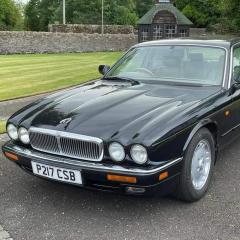
Evening, I'm the proud owner of a 1997 XJ6 Executive I won on a raffle. I've never been in one or driven one, so absolute novice and learner here with Jaguar brand. I've got the logbook in my name and I've taxed it. Waiting for Adrian Flux to call me tomorrow, but quoted £253.99 for fully comp insurance. Collect next Saturday in Montrose and can start adventuring 😄 It shall need O/S/F sill welded, radio looked into and the advisories sorted (bushes all round pretty much), plus TLC on the roof paint, but all minor stuff. It may even do Rust2Rome (Edinburgh to Rome) via the French Alps if I can convince my friend to leave his Suzuki Swift at home 😉 3.2l, straight 6, Executive X300 body. Think I might have to wear black and silver next week to compliment the car, plus a backpack of "stuff" just in case lol


