
Do Not Sell My Personal Information
Jump to content
View in the app

A better way to browse. Learn more.

Jaguar Owners Club

A full-screen app on your home screen with push notifications, badges and more.

To install this app on iOS and iPadOS
  1. Tap the Share icon in Safari
  2. Scroll the menu and tap Add to Home Screen.
  3. Tap Add in the top-right corner.
To install this app on Android
  1. Tap the 3-dot menu (⋮) in the top-right corner of the browser.
  2. Tap Add to Home screen or Install app.
  3. Confirm by tapping Install.

KarenM

Members
  • Joined

  • Last visited

  1. Always check the battery. Just because some stuff is working does not mean it is OK. Central locking and windows can go wrong when the battery is not up to scratch—I'm just saying this because it is a cheap thing to do and will avoid that day when it won't start!
  2. KarenM joined the community
  3. Hi, strikes me this would be a good place to say that I have a Jaguar that I am selling. £1,900 ono. It was MOT'd and fully serviced at the end of January, MOT to February 2025. 146000 miles. 2.2 diesel. Tyres have only done about 5000 miles, new air con bits, new battery with guarantee, brakes only 5% worn - new just over a year ago. Heated seats work. Things that do not work - parking sensors, petrol cap lock, and the bonnet needs propping up in cold weather. Got two keys for it. It is silver.
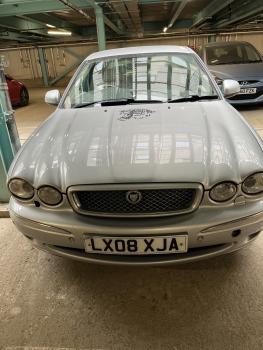
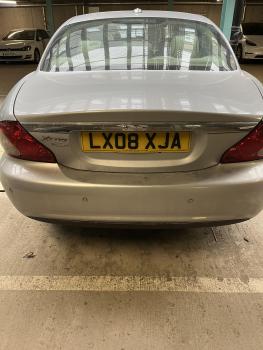


Background Picker
Customize Layout

Account

Navigation

Search

Configure browser push notifications

Chrome (Android)
  1. Tap the lock icon next to the address bar.
  2. Tap Permissions → Notifications.
  3. Adjust your preference.
Chrome (Desktop)
  1. Click the padlock icon in the address bar.
  2. Select Site settings.
  3. Find Notifications and adjust your preference.