Mr. Dangermouse
Members
-
Joined
-
Last visited
Everything posted by Mr. Dangermouse
-
Hi Jim, thanks for the reply and suggestion. Worth considering for sure - if the 'off-the-shelf' option doesn't bear any fruit.
-
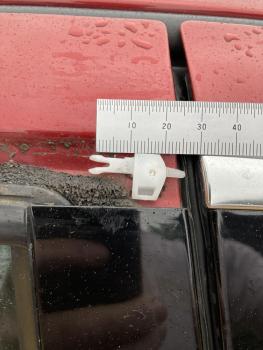
Hi Everyone, Trying to find the clips to fix my 2007 S-Type rear door exterior chrome frame finisher. Initially it was just the trailing edge that had parted company with the door as the tiny x-clips had broken. Think they just age-harden then crack. I managed to get replacement x-clips from Jag dealer (£££), but there is an odd / different clip at the top of the C-post capping which the dealer says is no longer available - see pics. Having removed the finisher to replace the x-clips, the odd clip doesn't want to retain the finisher anymore. If I'd have known, I wouldn't have completely removed finisher....doh! Before I try something drastic like using a good quality sealant adhesive to retain the finisher at that clipping point, though I'd ask a knowledgeable community for advice. Any help appreciated.