
Do Not Sell My Personal Information
Jump to content
View in the app

A better way to browse. Learn more.

Jaguar Owners Club

A full-screen app on your home screen with push notifications, badges and more.

To install this app on iOS and iPadOS
  1. Tap the Share icon in Safari
  2. Scroll the menu and tap Add to Home Screen.
  3. Tap Add in the top-right corner.
To install this app on Android
  1. Tap the 3-dot menu (⋮) in the top-right corner of the browser.
  2. Tap Add to Home screen or Install app.
  3. Confirm by tapping Install.

David X.j

Members
  • Joined

  • Last visited

  1. David X.j started following Fault P1247
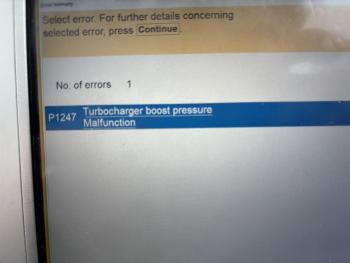
  2. 2011 XJL 3.0d V6 Car went into restricted performance cruising at 70mph on motorway. code read vehicle and had P1247 Turbo Charger Boost Pressure Malfunction With driver door open i could hear slight rattling when revs increased. checked all connections that i could as car was hot. erased the fault code and drove the car 20 miles. Full throttle and kickdown car is driving as it was, and full of power the fault code hasn’t returned and the car appears back to normal i know there is a software update relating to this code but i would assume that this has been done due to the age of the car any help or pointers would be great


Background Picker
Customize Layout

Account

Navigation

Search

Configure browser push notifications

Chrome (Android)
  1. Tap the lock icon next to the address bar.
  2. Tap Permissions → Notifications.
  3. Adjust your preference.
Chrome (Desktop)
  1. Click the padlock icon in the address bar.
  2. Select Site settings.
  3. Find Notifications and adjust your preference.