
Do Not Sell My Personal Information
Jump to content
View in the app

A better way to browse. Learn more.

Jaguar Owners Club

A full-screen app on your home screen with push notifications, badges and more.

To install this app on iOS and iPadOS
  1. Tap the Share icon in Safari
  2. Scroll the menu and tap Add to Home Screen.
  3. Tap Add in the top-right corner.
To install this app on Android
  1. Tap the 3-dot menu (⋮) in the top-right corner of the browser.
  2. Tap Add to Home screen or Install app.
  3. Confirm by tapping Install.

Philis46

Members
  • Joined

  • Last visited

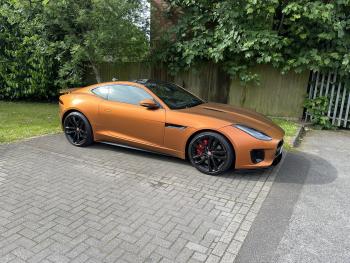
  1. Hi guys I have recently bought a 2020 FTYPE 3.0 V6 R Dynamic i put it into Dynamic Mode but can’t change screen to adjust suspension etc. am I doing something wrong also can’t get launched control to come up on dash. do they all have launch control many thanks Phil
  2. Philis46 replied to Philis46's topic in Jaguar Technical
    Thank you yes it’s on CeTeck charger with another Bluetooth monitor to my phone the battery is at 100 percent. I have 3 bikes all on optimate chargers. I just thought once I plugged the lead in it that the previous owner disconnected it would come back on. phil
  3. Philis46 posted a topic in Jaguar Technical
    Hi I recently bought a Ftype 3.0 v6 2020 but stop start won’t work I just have the logo pop up with a line through it. I have plugged in the switch in the boot that had been unplugged and also fitted a new battery. any ideas what it could be. manny thanks Phil


Background Picker
Customize Layout

Account

Navigation

Search

Configure browser push notifications

Chrome (Android)
  1. Tap the lock icon next to the address bar.
  2. Tap Permissions → Notifications.
  3. Adjust your preference.
Chrome (Desktop)
  1. Click the padlock icon in the address bar.
  2. Select Site settings.
  3. Find Notifications and adjust your preference.