


ArmyX300
Members
-
Joined
-
Last visited
Everything posted by ArmyX300
-
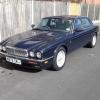 hi there just thought id introduce myself im shaun from north yorkshire just bought a XJ something i wanted for a while and picked up a gem of a X300 XJ6 on a 95 N. after a good clean today i have found it needs a new bonnet or extensive paint as lacquer has peeled etc and the central locking dont work plus one rear arch requires attention apart from that she is a peach.


