Jeff Bell
Members
-
Joined
-
Last visited
Everything posted by Jeff Bell
-

© Jeff Bell
-
-
-
-
-
-
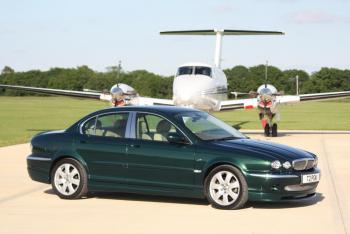
 My X Type beside a Beech 90 King Air (Jaguar Special Edition) One of 60 fitted with Jaguar interiors including seats with motifs and black beading.
 -
It's an Auto Tom, after had 3 Auto's now not sure I'd ever go back to manual...too much hard work in the queues to/from work ! Sorry to hear about your car-jack Steve, always make a point of using my garage for cars and not general household rubbish :-) Regards, Jeff
-
A new member to the club now on my second X Type after my beautiful racing green 2005 2.5 SE Auto was written off by a Pizza delivery driver ! Now have a 2009 black 2.2D Sovereign and am enjoying the MPG versus the petrol, although the sound is not as nice !