


Marco Polo
Members
-
Joined
-
Last visited
-
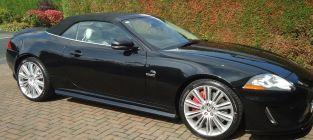
I have been a member of the forum for quite a while but not previously posted. I have a Jaguar XKR 5.0 convertible with Speedpack option, 2011MY, which I have owned since 2015. I bought it to replace a Mercedes SL500 R129 which, although a 5 litre engine disappointed me in it's performance - it was also too quiet, perhaps a bit soulless. As a young boy back in the 1950's, my dream car was the original XK model, from the XK120 through the XK140 to the XK150. So there was really only one option when it came to replacing the SL500. I decided to go the whole hog and went for the XKR knowing that I would always wonder how much better an XKR would be if I had just bought the standard XK, and it had to be a convertible - I love open-top driving. It's done 72,000 miles now but still feels like a new car - I couldn't be more pleased! Listening to the sound of that engine with the top down - wonderful!
-
Best practice is to have tyres on the same axle to be exactly the same, both manufacturer/brand and tyre type. I personally prefer Michelin and for my XKR chose the Pilot Sport 4S which came out top in most tyre reviews that I looked at. I recently replaced all four changing over from Dunlop Sport Maxx which i thought were not so good in the wet coping with the power under acceleration even though they were the original OEM tyre for the XKR. What tyres do you have on the front of your car?
