


Dan the man
Members
-
Joined
-
Last visited
-
 Hi Trevor, tried the on off etc but no luck. I am away for a few days now I'm a long distance driver so if I don't answer that's why. I will try and get some ideas from my local garage too, thanks again for your help, Danny
 -
Thanks Trevor, I will have a go in the morning, I really appreciate your efforts and your impressive vocabulary too, good luck with your festival hope you enjoy it, Danny.
-
Hello Trevor, sorry no luck, sprayed down ignition barrel and door lock but no change, thank you for your efforts, Danny
-
Hi Trevor, I will go and give it a try, thanks Danny
-
Hi Trevor, thank you for your reply, the main car battery is only 2 months old, I can see what your thinking a poor battery could cause problems, Danny
-
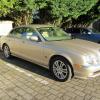
Hello all, hope you and your cars are running well. I am having trouble with locking and arming the alarm with the remote on the key, it will lock physically with the key, I have changed the battery and tried the spare key but no change, when I unlock the door with the key its sets off the alarm and I have to put the key in the ignition to silence it ( its amazing how many people in a busy shopping arcade did not bat an eye lid as I nervously tried to silence my alarm). my car is a 2004 s-type V6 SE , thank you Danny.
