


burkey9112
Members
-
Joined
-
Last visited
-
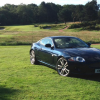 Hi, I bought a 2006 Jaguar XK new shape three days ago which I am very pleased about. I just have one question the previous owner had a new radiator fitted as it had stopped working and changed the thermostat. The heater and other components are working fine it would seem as I am getting hot and cold air. Now on my 80 mile journey home I had the engine temperature too high notice come on and engine overheating notice appear. I stopped the car checked the engine and the coolant and all seemed fine I started the car again and there were no issues all the way home for the remaining 50 miles. The only thing that does happen is that my fan will continue to run even if I have only been on a 10 minute journey does anybody have any ideas? I was thinking on changing the water pump. The car has probably completed about 80/90 miles since the the warnings came on various short journeys with no further warnings, except for the fan running on after use. The expansion tank is at the correct level of for the coolant, I can only think the the thermostat maybe faulty or that the water pump has given up. Any help would be great. Cheers, Sean
 -
Hi guys, Thanks for you comments, I bought a 2006, indigo blue, XK coupe today.
-
Good afternoon, I am looking at buying a used Jaguar XK 2006-2008 and I was wondering if you have any advice on what to look out for. I hope you can help, Regards and thanks in advance Sean
