Davies54
Members
-
Joined
-
Last visited
Everything posted by Davies54
-
 Great day Steve many thanks Paul
 -
Really looking forward to it

-
-

From the album: Goodwood Jaguars Drivers Day BH 4th May
© Paul Haydn Davies Photography
-

From the album: Goodwood Jaguars Drivers Day BH 4th May
© Paul Haydn Davies Photography
-

From the album: Goodwood Jaguars Drivers Day BH 4th May
© Paul Haydn Davies Photography
-

From the album: Goodwood Jaguars Drivers Day BH 4th May
© Paul Haydn Davies Photography
-
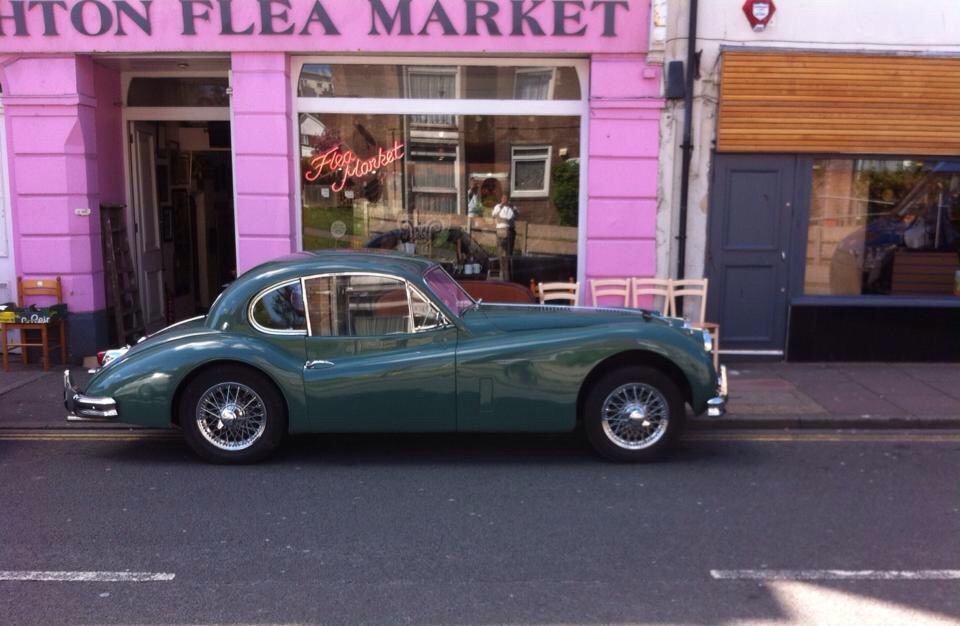
Since me and Bev have got in to Jaguars I see them everywhere including this beautiful example taken in my lunch break in Brighton yesterday Anyone on here ?

-
Me and Bev would love to attend the Brighton meet convoy xk and f type
-
Hi Paul here Me and Bev have not been in to Jaguars long Bev used to be in to Beemers and had an M6 For a few years before buying a XK 60th anniversary edition I previously had a Ford Focus RS that I spent a pretty penny on but as the new focus RS is on the horizon I thought I'd sell while they still held their price I saw the f_type in my local dealers and loved it Thanks for having us