


Lighthouse
Members
-
Joined
-
Last visited
-
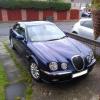 Hi everyone, I've been browsing through your forum and I'm very impressed! I bought a gorgeous 2003 73k S-type 2.5 SE on Saturday - pacific blue with sand leather. It was a wonderful drive back home, comfortable, quiet and quality - my daughter said that it felt like a wedding car! Not got any photos taken yet. I'll keep popping into the forum to get information on all sorts of things. One question: Is there a Haynes Manual for the S type? David.
