
Do Not Sell My Personal Information
Jump to content
View in the app

A better way to browse. Learn more.

Jaguar Owners Club

A full-screen app on your home screen with push notifications, badges and more.

To install this app on iOS and iPadOS
  1. Tap the Share icon in Safari
  2. Scroll the menu and tap Add to Home Screen.
  3. Tap Add in the top-right corner.
To install this app on Android
  1. Tap the 3-dot menu (⋮) in the top-right corner of the browser.
  2. Tap Add to Home screen or Install app.
  3. Confirm by tapping Install.

Pingz30

Members
  • Joined

  • Last visited

Everything posted by Pingz30

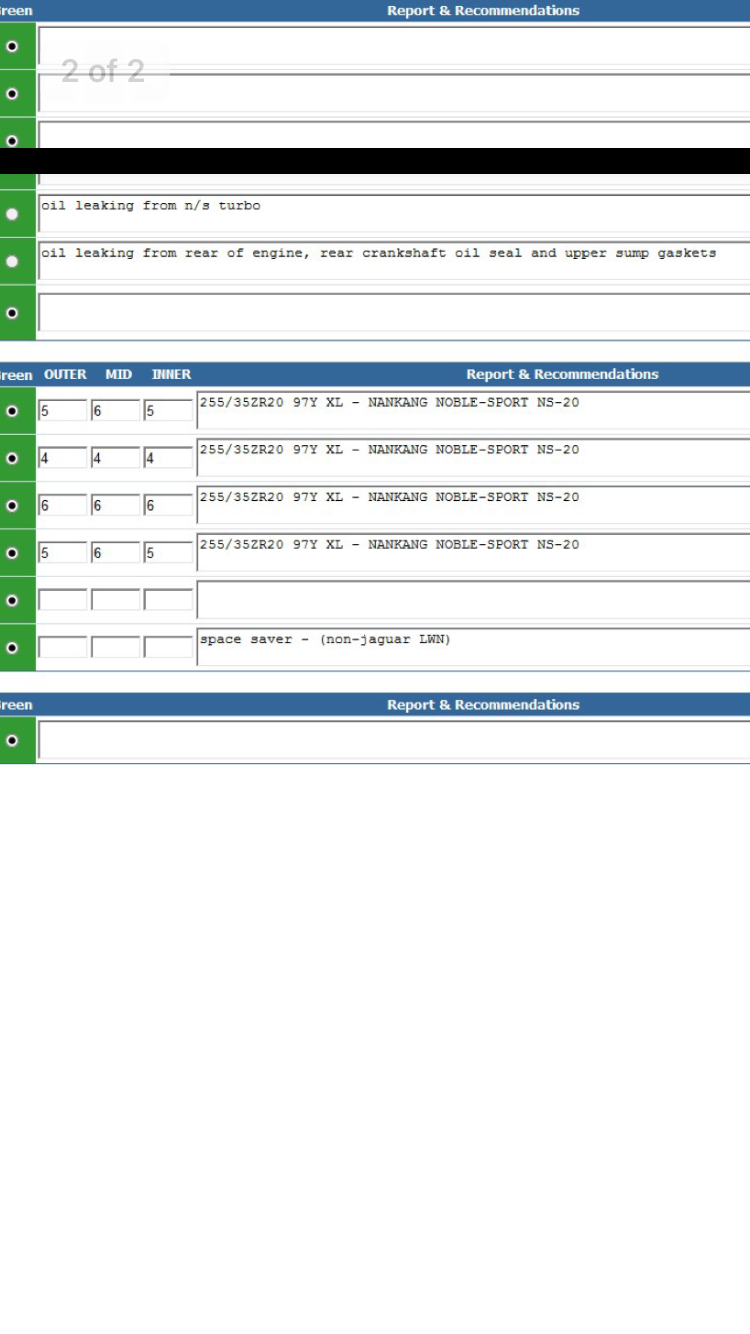
  1. Hi, thanks for the reply, there is no smoke coming from the car at all and generally runs very well which I found strange. I haven't noticed any loss in power or performance either. I have attached a copy of the VHC, what do you reckon from this? Jaguar were wanting £4500 to fix the problems on the VHC. thanks Mike 😀
  2. Hi I just had a major service done today at jaguar and they advised there was oil leaking from the n/s turbo which was marked down as Amber in the VHC and recommended I installed a new/reconditioned turbo, has anyone had any problems with this before or could even possibly recommend someone who supplies reconditioned turbos as jaguar were very expensive. Thanks very much Mike 😀

Background Picker
Customize Layout

Account

Navigation

Search

Configure browser push notifications

Chrome (Android)
  1. Tap the lock icon next to the address bar.
  2. Tap Permissions → Notifications.
  3. Adjust your preference.
Chrome (Desktop)
  1. Click the padlock icon in the address bar.
  2. Select Site settings.
  3. Find Notifications and adjust your preference.