


Chris 269
Members
-
Joined
-
Last visited
Everything posted by Chris 269
-
Hi Pete , Good old Triumph Herald they where a good car , easy to get to the engine and everything, the Trimph T100 was good bike you could have retired if you had those still Pete, I am a Lambretta man , had 5 and one got stolen that was the best one GP 200 electronic. Regards Chris
-
Hi Pete, Is that near Stratord-Apon-Avon if so thats a good way from me, I reckon they should have them in all large towns, it would make it more conveniant, I'm not sure how it works but years ago I was in the Triumph club and fortunately for me it was just down the road, I suppose you can't have it all ways. Regards Chris.
-
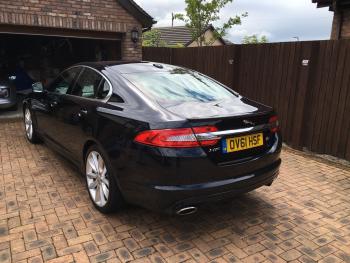
Hi Peter Thats a nice car ,I've always liked the shape of the front end, it's the classic Jag shape, it's almost the same colour as mine just a bit lighter, do you go to the Jag meeting,I'm not sure where they have them or what day they. Regards chris.

-
Cheers Peter, Yes its a lovely car, I was looking at the XJ 's a couple of weeks ago but they are massive and would have to pay a chauffeur to look the part haha. What car have you got Peter. kind regards Chris.
-
Hi to you all, just joined the club, I've just bought a 2011 xf Portfolio S 3ltr diesel, I've been wanting a Jag for years and I must say im not disappointed at all, well maybe the sat nav is a bit slow compaired to the Saab Ttid but can live with that.

