


Leaderboard
-
Spally
Members2Points3Posts -
nudgermanning
Members1Points3Posts

Popular Content
Showing content with the highest reputation on 01/24/2024 in Posts
-
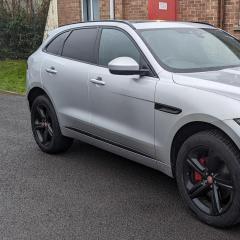
1 pointEvening all, just wanted to introduce myself and thankyou for letting me join the club. Recently lost my jaguar virginity by getting an F Pace S after writing off my previous Audi Q5 in the floods. Fancied something different with a bit more bite and first impressions have certainly been positive. Long may it continue I say
 1 point
 -
1 pointHi, just a little into to myself, I'm James and live on the Norfolk/Cambs border. I'm a 54 y/o truck driver and I've just obtained my first XF. I've had two previous Jaguars before, the first was a 2002 3.0 X Type, the latter being a 2008 2.0D X Type. I've now just bought and collected a 2012 XF 2.2 Premium Luxury. So far I'm loving it. Sadly I missed the fact it doesn't have a reversing camera and I've noticed the DAB isn't picking up a signal. Still, it's a lovely car and colour (Claret Pearl) and I will endeavour to rectify these problems and tap you all for advise and info. Many thanks. 20240113_145220.heic1 point
-
1 pointI'm a lorry driver, based out of Kings Lynn, usually terrifying the good people of the A10 between Lynn and Broxboure. Lol.1 point
