
Do Not Sell My Personal Information
Jump to content
View in the app

A better way to browse. Learn more.

Jaguar Owners Club

A full-screen app on your home screen with push notifications, badges and more.

To install this app on iOS and iPadOS
  1. Tap the Share icon in Safari
  2. Scroll the menu and tap Add to Home Screen.
  3. Tap Add in the top-right corner.
To install this app on Android
  1. Tap the 3-dot menu (⋮) in the top-right corner of the browser.
  2. Tap Add to Home screen or Install app.
  3. Confirm by tapping Install.

Donald McHarrie

Members
  • Joined

  • Last visited

Everything posted by Donald McHarrie

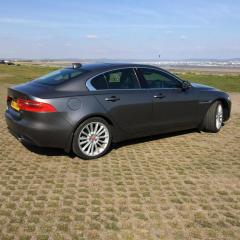
  1. Thank you Peter! I’m so new I have yet to pick the car up! I must wait until Friday! I’ve always liked the Jaguars, so I am looking forward to owning one. Going to enjoy the four-hour jaunt home! To SW Scotland! Tae Bonnie Galloway!
  2. Hi I'm in Stranraer, Scotland. I’m not in my Jaguar yet but looks like I will on Friday 12th

Background Picker
Customize Layout

Account

Navigation

Search

Configure browser push notifications

Chrome (Android)
  1. Tap the lock icon next to the address bar.
  2. Tap Permissions → Notifications.
  3. Adjust your preference.
Chrome (Desktop)
  1. Click the padlock icon in the address bar.
  2. Select Site settings.
  3. Find Notifications and adjust your preference.