
Do Not Sell My Personal Information
Jump to content
View in the app

A better way to browse. Learn more.

Jaguar Owners Club

A full-screen app on your home screen with push notifications, badges and more.

To install this app on iOS and iPadOS
  1. Tap the Share icon in Safari
  2. Scroll the menu and tap Add to Home Screen.
  3. Tap Add in the top-right corner.
To install this app on Android
  1. Tap the 3-dot menu (â‹®) in the top-right corner of the browser.
  2. Tap Add to Home screen or Install app.
  3. Confirm by tapping Install.

saveferris

Members
  • Joined

  • Last visited

Everything posted by saveferris

  1. Thanks Trevor. Thoroughly agree. Miles tend not to worry me, as I have always bought on condition and provenance.
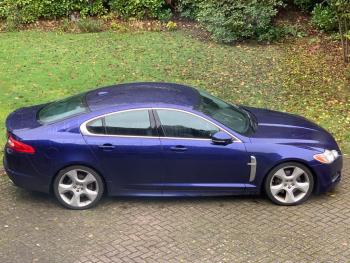
  2. A quick hello, I've just purchased a bargain basement miley, but immaculate 2011MY XF Portfolio S with Aerodynamic and Dynamic Packs. It's covered a lofty 192k, but the last chap had it for five years and the maintenance record is impeccable. Thrilled to get this spec and the car drove so well on the 150 mile trip back on Friday. I'm going to book it in for a B service, cambelt and water pump in the next couple of months and hope to pick your brains on issues as they arise 🙂


Background Picker
Customize Layout

Account

Navigation

Search

Configure browser push notifications

Chrome (Android)
  1. Tap the lock icon next to the address bar.
  2. Tap Permissions → Notifications.
  3. Adjust your preference.
Chrome (Desktop)
  1. Click the padlock icon in the address bar.
  2. Select Site settings.
  3. Find Notifications and adjust your preference.