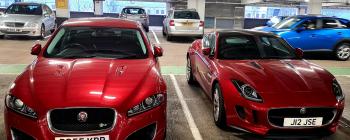
Underrated XfR
Members
-
Joined
-
Last visited
-
Hi there’s nothing from that side what so ever except drl,s and indicator the new bulb works on the other side so defo the right bulb. Thanks keith
-
Hi thanks for your help , I’ve been through the book and there isn’t an actual fuse for head lights ??
-
I’d put money on it being the battery
-
Would any one know what my next move would be regarding my head light bulb it’s blown so replaced but still no joy ?? any help would be much appreciated
-
Ah thanks very much ,I’ve just had spacers fitted and now looks so much better , unfortunately not as yet I’m going to have to get it looked at 😖
-
Hi everyone hope you all had a good Christmas, I’ve just purchased a 2013 xfr have to say well chuffed completely different to my previous bmw m5, this new car is completely underrated . having a problem already head light bulb blown brought a new one and still no light . has anyone got experience with this the bulb was clearly blown . so a hello and please help in one go , thank you In advance.