
Do Not Sell My Personal Information
Jump to content
View in the app

A better way to browse. Learn more.

Jaguar Owners Club

A full-screen app on your home screen with push notifications, badges and more.

To install this app on iOS and iPadOS
  1. Tap the Share icon in Safari
  2. Scroll the menu and tap Add to Home Screen.
  3. Tap Add in the top-right corner.
To install this app on Android
  1. Tap the 3-dot menu (⋮) in the top-right corner of the browser.
  2. Tap Add to Home screen or Install app.
  3. Confirm by tapping Install.

CJay

Members
  • Joined

  • Last visited

  1. Thanks Peter - having waited 3 hours in the rain once to be rescued when I had a blow out and only the can of gunk, I vowed to always have a spare wheel, even a space saver, from that point onwards. I was only 15 minutes from home at the time. Best, Chris.
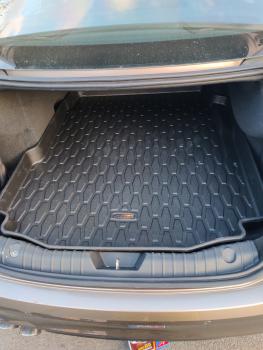
  2. I have a Jaguar XF R-Sport AWD 2016 with Meridian Surround Sound and once the huge chunk of polystyrene was removed, the space saver spare wheel went in fine, with the battery underneath the wheel. The jack, etc. is in a cheap canvas tool bag behind the wheel. Boot cover is then flat over the wheel and boot mat flat on top of that. I've relegated the can of gunk and pump to the under stairs cupboard. Just need the screw thing to hold the wheel in place but it's not going to move much anyway wedged in there.



Background Picker
Customize Layout

Account

Navigation

Search

Configure browser push notifications

Chrome (Android)
  1. Tap the lock icon next to the address bar.
  2. Tap Permissions → Notifications.
  3. Adjust your preference.
Chrome (Desktop)
  1. Click the padlock icon in the address bar.
  2. Select Site settings.
  3. Find Notifications and adjust your preference.