


Paldi5
Members
-
Joined
-
Last visited
-
I'm interested. Someone said the sunroof mechanism is in the way.IMG_5587.heic
-
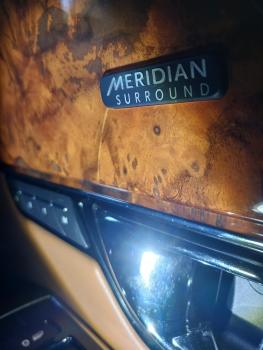
I have a small crack on the driver's door.
-
I bought mine in late March also without an owner's manual. Luckily, I found one on eBay out of a 2018 XJL in a junkyard. $50.00
-
I think the radar window looks funny sticking proud of the grill like that. I also think the grill's "holes" should be painted black and just the front face left as chrome.


-
I have spotted a small crack in the wood trim on my 2019 XJL driver's door. What are the options to repair it other than trying to source a new part. I understand they are not being manufactured and are very hard to match. I'm looking for an epoxy or glue solution that won't spoil the rest of the surface. Thank you.

-
I have a small crack in the wood trim on the driver's door (under the M in Meridian). I think it's the plastic covering. How do I fill in the crack and keep it from spreading?

-
I named my 2019 XJL "Tata" as in "See you later." New to me a month ago. 😁


