


Dajaview
Members
-
Joined
-
Last visited
Everything posted by Dajaview
-
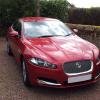 Thanks Mr D. Well, picked up my new XF on Saturday and it has been a delight. Still finding my way around the gadgets but all seems well. Don't know why I didn't do this sooner! :) Dave
 -
Hello, I've just joined the forum although I have owned two Jaguars previously. Both were S Types. My current one is a 2007 (57) 2.7 D SE which I've had for 3 years during which time I have clocked up 70000 miles in it. It's time to move on though so I droped in to my local Jag dealer yesterday to enquire about any second hand cars they had. Not sure what happened next but I've ended up buying a brand new Jaguar XF 3.0 Diesel Luxury! Looking forward to picking it up on Saturday morning once they have taken it out of the wrappers. It's in Italian Racing Red so it's gonna be bright. I must say though that I'll be sorry to see my S-type go. It's been a loyal friend to me for the past three years and never let me down once. Now I'm looking forward to driving my XF and would like to hear of other members experiences of the XF too. Dave
