


Daico
Members
-
Joined
-
Last visited
Everything posted by Daico
-
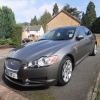 Hi all members. Dave signing in as a newbie. For 4 years I had an X type but have now updated to an XF luxury. Very pleased with it. I have been using it quite a bit on long trips on motorways and also do quite a bit on the country roads around where I live in the Abergavenny area. No problems so far except that the SatNav is still in 2010 mode so occasionally I get to roads that are no longer there or have been rerouted!! I can live with that though and it adds to the fun. Overall delighted though and glad to be a member of the club.
