


Dec 2014
By Bezza
- 1,286 views
- View Bezza's images
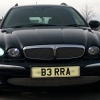
This and next 5 photos were taken on the day I bought the car.
Fairly tidy but in need of a major clean inside due to the previous but one owner having had a dog and the boot area was just covered in years of dog hair accumulation YUK!
18" Arubas fitted which are tatty and in need of a refurb, albeit the tyres are good. Odd mark here and there and the dog owner had never bothered to fit a bumper guard so doggy scratches to the top of the rear bumper- one for the to do list along with the front bumper which has the odd mark here and there, together with the obligatory supermarket trolley dink in the front passenger door..
Other than that 88k with full Jaguar service history and all receipts. Has had LPG fitted but has been removed, I may possibly refit that. Drives very well and pretty much all the toys but I will be adding to that along the line.
Came supplied with unfitted upper and lower mesh front grilles and full set of genuine mudflaps- bonus!