


popeye
Members
-
Joined
-
Last visited
Everything posted by popeye
-
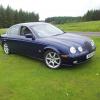 Hi all Could anyone tell me if my drivers seat should move right back when I remove the ignition key to get out? The steering wheel lifts right up and in but no seat movement. I don't know if it has to be set up to do so. Regards Keith
 -
Hi Pete I have begun to enjoy the Jaguar experience today with a fantastic drive out in glorious sunshine. Truly stunning performance from such a big 4 door salon together with comfort and luxury. First car I have owned that not only turns heads but attracts good comments from friends family even total strangers! One down side unfortunately the AC does not appear to be working :( Will ring the dealer tomorrow for advise as it comes with six month warranty.
-
Yes Trevor its in beautiful condition for its age with 54 k on the clock Jaguar fsh and two previous owners.
-
finally picked up my first jag yesterday wow!
-
Will do Trevor. I pick it up this week. Can't wait!
-
I have just bought an S TYPE chufeed to bits !
