


Hate cyclist
Members
-
Joined
-
Last visited
Everything posted by Hate cyclist
-
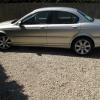 Hi everyone. Having just bought my XType and yes I have read the user manual. Could someone please tell me what actually happens when you press the S (Sport) button. I haven't pressed it yet and would welcome some advice before I do.
 -
Hi everyone as you can tell by my post name I'm not a lover of cyclist who don't conform to the highway code unfortunately that means 99%. I've just bought my beautiful X Type and cannot believe the difference from my earlier XJ6. Jaguar have certainly come a long way. My wife and I have just been out for our first drive in it and had lunch, well it was the least I could do as she let me spend the money to buy it. I'll post a photo as soon as I've taken one.
