

Do Not Sell My Personal Information
Jump to content
View in the app

A better way to browse. Learn more.

Jaguar Owners Club

A full-screen app on your home screen with push notifications, badges and more.

To install this app on iOS and iPadOS
  1. Tap the Share icon in Safari
  2. Scroll the menu and tap Add to Home Screen.
  3. Tap Add in the top-right corner.
To install this app on Android
  1. Tap the 3-dot menu (⋮) in the top-right corner of the browser.
  2. Tap Add to Home screen or Install app.
  3. Confirm by tapping Install.

Leaderboard

Popular Content

Showing content with the highest reputation on 09/30/2015 in Posts

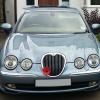
  1. Well, at long last, The Princess has gone for various parts to be resprayed. I'm like an expectant father I was lucky enough to be offered a loan car, a Vauxhall Astra. The only problem is that I haven't got enough feet
  2. Count me in (barring unforeseen circumstances) + 2 For the run down and the meet 2003 S-Type cheers
  3. 1 point
    chris you could be right on all counts but an x-type owner should pop-up soon to give you advice, on the site ther is an indie garage section recommended but members that maybe you can find one close to you, all the xtype guys is ither in their beds or waching telly
  4. 1 point
    good man chris welcome to the fold enjoy your car atb joe :P


Background Picker
Customize Layout

Account

Navigation

Search

Configure browser push notifications

Chrome (Android)
  1. Tap the lock icon next to the address bar.
  2. Tap Permissions → Notifications.
  3. Adjust your preference.
Chrome (Desktop)
  1. Click the padlock icon in the address bar.
  2. Select Site settings.
  3. Find Notifications and adjust your preference.