




Norfolk Ian
Premium Member
-
Joined
-
Last visited
Everything posted by Norfolk Ian
-
 Desk
Desk -
Was sorry to miss this
-
Study
-
Support
-
Sherwood
-
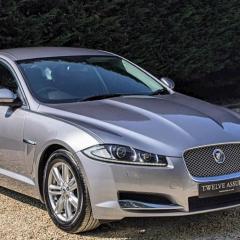
Hi, I’ve had my first Jag an XF for 16 months now and it’s been great. You can see some of my photos in the gallery. Enjoy your Jag. All the best Ian

-
Sherwood
-
Whale
-
Respectful
-
Behaviour
-
Reload
-
My Jaguar XF Viewed and purchased 14th October 2023, took delivery on 20th October.
-
 Jaguar Enthusiast Magazine
-
 Fields of gold
-
 Amongst the fields of barley 🌾
-
 Duxford IWM Visit
-
 Simply Jaguar 2024
-
 Front end
-
 Simply Jaguar Beaulieu
-
 Chatsworth House
-
 Derbyshire Dales
-
 A trip to the seafront arcade
-
 Detailing and Valeting completed
-
 Lynford Thetford Forest 🌲
-
 Sequoioideae Avenue 🌲
-
 Autumn dappled light 🍂
-
 Custom House King’s Lynn
-
 Norfolk Full Moon 🌕
-
 Full Moon 🌕
-
 Official Jaguar Owners Club Member
-
 Norfolk mist
-
 Castle and Mist
-
-
From the album: Norfolk Ian
I was pleased to see a photo of my Jaguar XF in the Jaguar Enthusiasts' Club Magazine August issue taken at the “Simply Jaguar” event in June at Beaulieu, National Motor Museum© Norfolk Ian
-
Hi All, I’ll leave it until this evening, but as I’ve had no response I’ll assume there is no interest so will cancel. Kr, Ian

-
Leader
-
Mystery
-
Score
-
Welcome Keith, I became a Jaguar owner for the first time last October. The JOC are very friendly and helpful. Enjoy your Jag and do post some photos in the gallery. All the best Ian
-
Football
-
Slope
-
Blood
-
Cream
-
Projectile
-
Catapult
-
I’ve posted details of the planned event for Norfolk / Suffolk on Saturday 31st August in the Events section- Hope some of you can come along




