


Leaderboard
-

Norfolk Ian
Premium Member2Points306Posts -
Dave Langley
Members1Points9Posts -
Wrinkly
Established Member1Points2,160Posts -
LairdScooby
Moderators1Points1,273Posts


Popular Content
Showing content with the highest reputation on 07/21/2024 in Posts
-
1 pointHi all I have posted already due to gear box fault warning, pride owner of 07 X type 3.0 sovereign estate 70.000 miles Dave L1 point
-
1 pointWelcome Dave, I’ve found JOC to be very helpful and friendly do post some photos of you car in the gallery. Kr Ian1 point
-
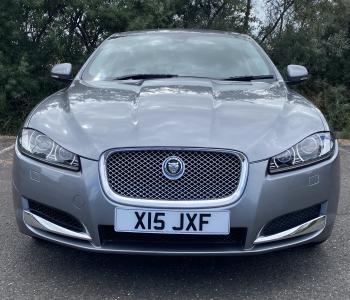
1 pointI enjoy looking in the members gallery and encourage other JOC members to post photos of their Jag, I thought a thread of Front Ends would be good to see, with a little detail if you wish. Here’s my XF which I purchased in October 2023.
 1 point
 -
1 point
-
1 point
-
1 pointNice one Ian! This is my XK8. I've only had her for about 3 months. Endless grin!!
 1 point
 -
Being a law obiding individual I took Charlie to the vets this week to get him "chipped". Very disappointed with the outcome though. No faster and certainly no better economy. (Charlie, by the way, is a half bred Bengal)1 point


