Do Not Sell My Personal Information
Jump to content
View in the app

A better way to browse. Learn more.

Jaguar Owners Club

A full-screen app on your home screen with push notifications, badges and more.

To install this app on iOS and iPadOS
  1. Tap the Share icon in Safari
  2. Scroll the menu and tap Add to Home Screen.
  3. Tap Add in the top-right corner.
To install this app on Android
  1. Tap the 3-dot menu (⋮) in the top-right corner of the browser.
  2. Tap Add to Home screen or Install app.
  3. Confirm by tapping Install.

Leaderboard

Popular Content

Showing content with the highest reputation on 01/17/2016 in Posts

  1. Thanks guys. It's a bit grim up where I am at the moment.
  2. Well done Nigel im sure she will have been worth the back ache Steve
  3. MOT

    1 point
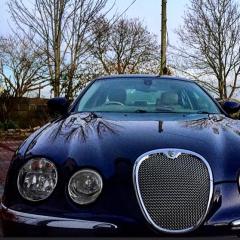
    The newest S Types are now 8 years old, and many are looking like new, which shows that they are a good car to own and look after. Mine has only done 65k and drives like a dream. Peter. Photo snapped yesterday - needs a good wash but still looks good.
  4. MOT

    1 point
    Thats great! still going strong after all those miles, you must look after her well
  5. Hi, welcome. Should be two screws and a plug. Dead easy.


Background Picker
Customize Layout

Account

Navigation

Search

Configure browser push notifications

Chrome (Android)
  1. Tap the lock icon next to the address bar.
  2. Tap Permissions → Notifications.
  3. Adjust your preference.
Chrome (Desktop)
  1. Click the padlock icon in the address bar.
  2. Select Site settings.
  3. Find Notifications and adjust your preference.