Do Not Sell My Personal Information
Jump to content
View in the app

A better way to browse. Learn more.

Jaguar Owners Club

A full-screen app on your home screen with push notifications, badges and more.

To install this app on iOS and iPadOS
  1. Tap the Share icon in Safari
  2. Scroll the menu and tap Add to Home Screen.
  3. Tap Add in the top-right corner.
To install this app on Android
  1. Tap the 3-dot menu (⋮) in the top-right corner of the browser.
  2. Tap Add to Home screen or Install app.
  3. Confirm by tapping Install.

Leaderboard

Popular Content

Showing content with the highest reputation on 12/06/2025 in all areas

  1. 1 point
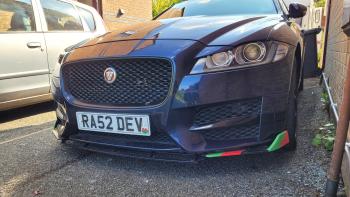
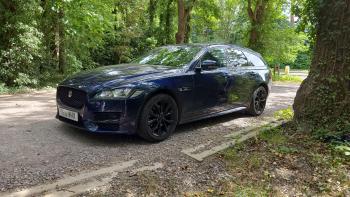
    my XF in a nice wooded are on the day i bought it. Then at home after fitting a chin splitter. She looks mean.
  2. Hi Thanks for your response. I have had the same issue with either of my keys and I have replaced the batteries in both. I had a new drivers door latch fitted as well as tgd new boot latch. One garage told me it was the gear selector unit, so that was replaced and the problem still exists. It is with an auto electrician at the moment but it starts every time he tries, so no fault appears on the diagnostic……. Soul destroying !


Background Picker
Customize Layout

Account

Navigation

Search

Configure browser push notifications

Chrome (Android)
  1. Tap the lock icon next to the address bar.
  2. Tap Permissions → Notifications.
  3. Adjust your preference.
Chrome (Desktop)
  1. Click the padlock icon in the address bar.
  2. Select Site settings.
  3. Find Notifications and adjust your preference.