Do Not Sell My Personal Information
Jump to content
View in the app

A better way to browse. Learn more.

Jaguar Owners Club

A full-screen app on your home screen with push notifications, badges and more.

To install this app on iOS and iPadOS
  1. Tap the Share icon in Safari
  2. Scroll the menu and tap Add to Home Screen.
  3. Tap Add in the top-right corner.
To install this app on Android
  1. Tap the 3-dot menu (⋮) in the top-right corner of the browser.
  2. Tap Add to Home screen or Install app.
  3. Confirm by tapping Install.

Welcome to the Jaguar Owners' Club!

Membership is completely free, and our community is built by enthusiasts, for enthusiasts. We’re a proudly independent, non-official club, so all the help and opinions you’ll find here come directly from members with real experience of Jaguar Ownership from REAL people.

Join the club! Become part of the community!


Featured Replies

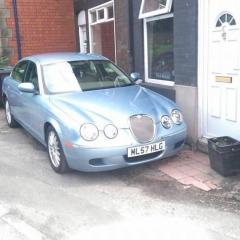
Hi everyone I have just got myself a lovely 2.7 s type 57 reg without satnav I could of got one with it but it had 120k mileage and the one I bought has only 69k so the lower mileage car at around the same price had to be the one Anyway I was just wondering how hard it would be to retrofit the satnav system if at all possible Any help would be great Thank you


Hi David

welcome to the club, I know my car is a lot older than yours, so don't know if that makes a difference or not, but very soon after I got mine, I asked a jaguar main dealer mechanic that very same question (I was going to get one from an s type that was being broken) he said basically don't try it, it's a massive job! Something to do with needing the wiring looms, running them from the boot all the way through the car , seats out, carpet up, dash apart, and so on. There are guys on here who do retro-fits for fun, so they may well laugh at the advice I received, I'm sure they'll respond soon 

Regards 

Steve 

Hi

I'm sure because yours is 2007, it will all be plug and play

at worse case, you will need someone with sdd software just, to plug in which will tell all the other modules it has sat nav, so things like jaguar voice will work properly with it

I'm sure all the wiring will be there

someone else on here hopefully will come it and confirm it

I take it, it  has the touch screen

cheers

Joe

hi paul

I dont think ive seen a 2007 one without a touchscreen,  I thought they were standard by that time

cheers

9 hours ago, JOE-DOT-COM said:

hi paul

I dont think ive seen a 2007 one without a touchscreen,  I thought they were standard by that time

cheers

Thanks Joe, I wasn't aware of that. It would be a fair bit of the retrofit done then  :)


  • Author

Thanks everyone for your replys but still non the wiser if it is a rewire job then it can stay as it is as I have mobile phone as a satnav lol Thanks all 


  • Author

No mate no touch screen 


There's a post on the other jag forum by a guy that scrapped his Stype and swapped the satnav over onto his new car.


even with the old car next to the new one it was still a monster ball ache apparently. 

Seems jaguar have two looms, one with nav and one without!!

  • Author

Thanks Andy if thats the case it can stay as it is 


Hello David. I share your pain because the model I have also had the option of the sat-nav, which I unfortunately don't have. Have you thought about getting a double Din stereo with touch screen and built in GPS? Ive also heard rumours that the S-Type sat nav maps can only be updated to around 2013 but don't know how true this is.

The last disc available for the denso dvd nav system was indeed only upto 2012 which coincided with jaguar bringing out the phase 2 XF which uses a different system.


i have the latest disc in my car and it's more the adequate despite being 4 years out of date.


i use navmii free satnav on my android phone when we're in the missus's Abarth. 

I'm envious of that Andy. That 7" colour screen makes the dash look a lot fresher in my opinion. The nav is the bonus!

Latest Deals

Scorpion® Vehicle Tracker Offer - Next Generation CAN-Bus Immobilisation

Disclaimer: As the club is an Scorpion® Partner, The club may be compensated if you make a purchase via Scorpion® links

Create an account or sign in to comment


Background Picker
Customize Layout

Configure browser push notifications

Chrome (Android)
  1. Tap the lock icon next to the address bar.
  2. Tap Permissions → Notifications.
  3. Adjust your preference.
Chrome (Desktop)
  1. Click the padlock icon in the address bar.
  2. Select Site settings.
  3. Find Notifications and adjust your preference.