


Leaderboard
-
GolfyG
Members1Points29Posts -
jbrubakerjr
Members1Points3Posts -
thistle4celtic1
Members1Points26Posts -
Wrinkly
Established Member1Points2,160Posts


Popular Content
Showing content with the highest reputation on 04/15/2022 in all areas
-
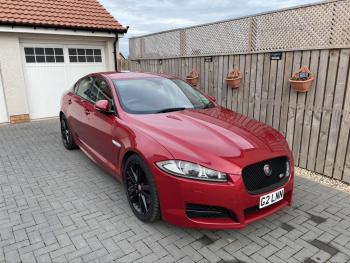
In Ideal situation, I would have the same model, same colour but a sportbrake this time. Just bought a Choc lab pup and soon it will be to big an mucky for my cranberry leather seats. Cash either way possible. Mot Nov23 49k miles 2014 Italian Racing Red New Dunlops. Std spec apart from this. Will get more pics up this weekend.

 1 point
 -
1 pointSo, you can't access the boot due to the battery being dead? If so, try this.....1 point
-
1 pointThanks, Julie! I had done that, unfortunately, my key was never cut. I was able to remove the side pillars in the rear seat, and the bottom bolts from the rear seat, and using an extension tool then disengage one of the seats to fold forward. This allowed be to reach the manual boot hood release (escape) latch located at the back of the compartment on the boot lid itself.1 point
-
Bought mine a few months ago from here, along with the Catalytic Converter Seemed . OK they know there stuff, were very helpful and delivery was quick. Product is of good quality. Photos of product on my earlier submission regards Catalytic converter. https://www.onlineautomotive.co.uk/cheap-car-parts/Proton/Catalytic-Converters?gclid=EAIaIQobChMInLjE2b2C9gIVCO3tCh0H9AjVEAAYASAAEgLGTPD_BwE Best Wishes and Regards, John1 point

