


Leaderboard
-
Old Peter
Established Member1Points7,408Posts -

The Voices
Established Member1Points412Posts -
Herboneus
Members1Points2Posts



Popular Content
Showing content with the highest reputation on 09/29/2016 in all areas
-
1 pointWill do, I will post some more photos - if I manage to get out of the car long enough...1 point
-
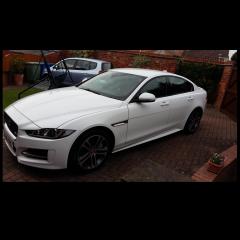
1 pointWelcome to the Club, Edmund. First, let me say that you have a very nice car --- nice colour too. At a guess, I think the issue could well be a fuel one. I have not driven a manual Jaguar for over 3 years, currently having a 2.7 Diesel S type - but as you car picks up better at a slower speed and is OK when it gets going I would suggest a fuel system cleaning additive --- under a tenner -- Diesel Magic, or Wynn's --- that will probably assist. Regards, Peter.1 point
-
It does sound like the headlamp adjusters have broken. Probably quicker and easier to replace the complete headlamp assembly with a 'good' used one as you still need to remove the headlamp unit to replace the adjusters. I managed to replace the headlight unit on my 2003 without completely removing the bumper. Undid everything on the same side of the bumper as the failed headlight and the loosened the grille, then pulled the bumper forward. This gave me enough space to get to the bottom mounting bolts. I bought a set of replacement adjusters off Ebay as well to repair the broken lamp unit as a spare, the replacement adjusters fell in bits during the fitting procedure ! Luckily the seller replaced them FOC. Fitting the adjusters is a bit of a pain, as you need to dismantle the headlamp assembly, including splitting the clear lense from the backing unit.1 point