


Leaderboard
-

Carl Gibbs
Established Member2Points259Posts -
Old Peter
Established Member1Points7,408Posts -

Aubrey
Moderators1Points1,245Posts -
Peg Wolfe
Members1Points3Posts






Popular Content
Showing content with the highest reputation on 01/21/2022 in all areas
-
1 point
-
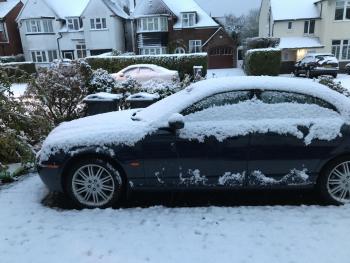
1 pointWelcome to the Club, Peg. Nice car and a nice view. Bill Lyons, who was the very first owner of Jaguar Cars said "Grace, Pace and Space". Enjoy. Peter.
 1 point
 -
1 pointProfuse thanks to both of you, Julie and Carl! There are indeed a lot of lovely drives up here, as NE Illinois and SE Wisconsin are covered with woodlands, small glacial lakes, and beautiful rolling farmland. The Jag appears unfazed by the current bitter cold (it's just after 6PM, and down to 13 degrees F, or -10.5C!). Handles like a real champ on snow & ice, too. 💖 Now if I can just figure out how to use those paddles, I'll be the happiest driver in Illinois!1 point
-
1 point
-
1 pointGood Morning Peg, Welcome to Jaguar Owners. A very elegant car indeed. I understand how you loved it at first site. I am sure there are some wonderful roads to drive where you are. enjoy! Kind Regards, Julie.1 point
